CusSuKA
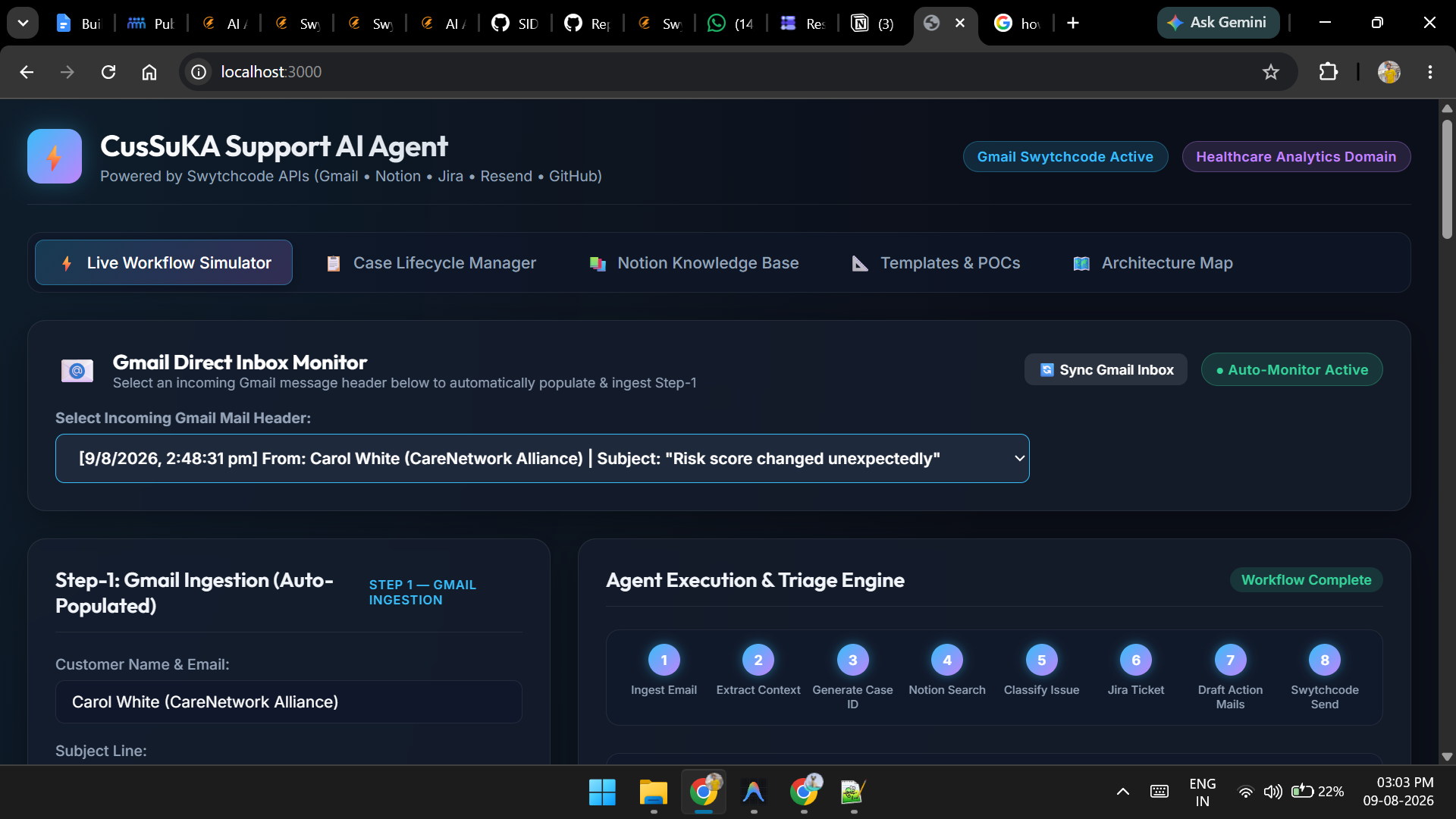
Link to open source: https://github.com/SIDHANT2K1/CusSuKA
# AI Customer Support Knowledge Agent
An AI-powered customer support agent that understands incoming support
emails, retrieves relevant company knowledge, determines the right
resolution path, coordinates with engineering or business teams, creates
Jira tickets, and drafts customer-facing updates.
## Problem Statement
Customer support teams often need to read customer emails, understand
the underlying issue, search company knowledge, determine the right
team, create engineering tickets, communicate with internal teams, keep
customers updated, and close cases.
This project automates that workflow using an AI agent connected to
Gmail, Notion, Jira, Resend, and GitHub.
## Objective
The agent should:
1. Analyze incoming customer emails.
2. Extract customer, product, issue, impact, and context.
3. Create and track a support case.
4. Search the company knowledge base.
5. Resolve issues directly when approved knowledge is sufficient.
6. Classify unresolved issues into Data Engineering, Data Science,
Frontend, Middleware/API, or Business.
7. Identify the relevant team and POC.
8. Create a structured Jira ticket.
9. Draft actionable internal escalation emails.
10. Draft customer updates.
11. Track engineering/business responses.
12. Communicate resolution and RCA.
13. Close the support case after validation.
## High-Level Architecture
``` mermaid
flowchart TD
Customer["Customer"]
Gmail["Gmail<br/>Incoming Support Email"]
Agent["AI Customer Support Agent<br/>Swythcode API"]
Analyzer["Mail Analyzer<br/>Subject + Body"]
Context["Context Extraction<br/>Issue + Customer + Impact"]
Classifier["Issue Classification"]
KB["Notion<br/>Company Knowledge Base"]
Router["Resolution Router"]
Direct["Direct KB Resolution"]
Engineering["Engineering Escalation"]
Business["Business Escalation"]
DE["Data Engineering"]
DS["Data Science"]
FE["Frontend"]
MW["Middleware / API"]
Jira["Jira<br/>Engineering Ticket"]
Resend["Resend<br/>Email Delivery"]
GitHub["GitHub<br/>Codebase / Technical Context"]
CustomerUpdate["Customer Update"]
Closure["Resolution & Case Closure"]
Customer --> Gmail
Gmail --> Agent
Agent --> Analyzer
Analyzer --> Context
Context --> Classifier
Agent --> KB
KB --> Classifier
Classifier --> Router
Router --> Direct
Router --> Engineering
Router --> Business
Direct --> Resend
Engineering --> DE
Engineering --> DS
Engineering --> FE
Engineering --> MW
Engineering --> Jira
Jira --> GitHub
Jira --> Resend
Business --> Resend
Resend --> CustomerUpdate
CustomerUpdate --> Customer
Engineering --> Closure
Business --> Closure
Direct --> Closure
```
## Core Workflow
``` text
Customer Email
|
v
Gmail
|
v
AI Support Agent
|
v
Analyze Email
|
v
Extract Context
|
+-----------------------------+
| |
v v
Search Notion KB Classify Issue
|
+---------------+---------------+
| | |
v v v
Knowledge Engineering Business
Resolution Issue Issue
| | |
v v v
Draft Reply Create Jira Retrieve Business
| Ticket Context
| | |
| v v
| Identify Team Draft Response
| |
+-------+-------+
|
v
Customer Update
|
v
Track Resolution
|
v
Validate Fix
|
v
Final Response
|
v
Close Support Case
```
## Agent Responsibilities
### 1. Email Understanding
The agent analyzes:
- Subject
- Email body
- Customer identity
- Product/application
- Environment
- Error messages
- Dates/timestamps
- Affected data
- Expected behavior
- Actual behavior
- Business impact
- Customer expectation
- Urgency
Example:
``` text
Subject:
Patient count incorrect after latest refresh
Body:
After today's refresh, our dashboard shows 1,180 patients.
We expected approximately 1,250. Please investigate.
```
The agent converts the email into structured context:
``` json
{
"support_case_id": "SUP-2026-00124",
"issue_type": "data_quality",
"summary": "Patient count lower than expected after refresh",
"expected": "Approximately 1,250 patients",
"actual": "1,180 patients",
"impact": "Customer reporting may use an incorrect patient population",
"suspected_area": "Data Engineering",
"priority": "High"
}
```
### 2. Knowledge Retrieval
Notion acts as the organization's structured knowledge layer.
Recommended knowledge categories:
``` text
Company Knowledge
|
+-- Product Knowledge
+-- Healthcare Knowledge
+-- Data Definitions
+-- Business Rules
+-- Engineering Documentation
+-- Troubleshooting Guides
+-- SOPs
+-- Customer Support FAQs
+-- POC / Team Directory
+-- Jira Templates
+-- Customer Email Templates
```
### 3. Issue Classification
The agent determines whether the issue is:
- Directly resolvable using approved knowledge
- Engineering-related
- Business-related
Engineering routing:
-----------------------------------------------------------------------
Team Typical Issues
----------------------------------- -----------------------------------
Data Engineering ETL failures, missing data, data
quality, refresh failures, schema
issues
Data Science Model issues, metrics, scoring,
features, model behavior
Frontend UI bugs, dashboard issues,
browser-specific problems
Middleware API failures, integrations,
authentication, service
communication
Business Business rules, metric definitions,
customer-specific requirements
-----------------------------------------------------------------------
## Engineering Escalation
For an engineering issue, the agent:
1. Retrieves relevant Notion knowledge.
2. Determines the engineering team.
3. Identifies the POC.
4. Selects the Jira template.
5. Creates the Jira ticket.
6. Drafts an internal escalation email.
7. Requests investigation, RCA, ETA, and next steps.
8. Sends a customer progress update.
9. Tracks Jira status.
10. Validates the fix.
11. Sends the final customer response.
Internal escalation should clearly state:
``` text
What happened?
What is known?
What is suspected?
What needs to be investigated?
What is the customer impact?
What does the customer expect?
What action is required?
What ETA is requested?
```
## Business Escalation
Business escalation is used for:
- Metric definitions
- Business rules
- Customer-specific logic
- Population inclusion/exclusion
- Product behavior clarification
- Business process questions
- Requirements and feature interpretation
Workflow:
``` text
Customer Email
|
v
AI Analysis
|
v
Business Issue
|
v
Retrieve Notion Business Knowledge
|
v
Identify Business Team / POC
|
v
Draft Business Clarification Email
|
v
Receive Business Decision
|
v
Draft Customer Response
```
## Jira Integration
Jira is used for engineering issue tracking.
Recommended reusable templates:
``` text
JIRA-TPL-001 Standard Engineering Bug
JIRA-TPL-002 Data Engineering Issue
JIRA-TPL-003 Data Science / Model Issue
JIRA-TPL-004 Frontend Bug
JIRA-TPL-005 Middleware / API Issue
JIRA-TPL-006 Data Quality Issue
JIRA-TPL-007 Production Incident
JIRA-TPL-008 Business Requirement / Clarification
JIRA-TPL-009 Enhancement / Feature Request
JIRA-TPL-010 Customer-Reported Bug
```
A generated Jira ticket should normally contain:
- Support Case ID
- Customer
- Product
- Environment
- Issue type
- Engineering area
- Summary
- Description
- Expected behavior
- Actual behavior
- Customer impact
- Evidence
- Notion knowledge references
- Initial analysis
- Suspected cause
- Confirmed RCA
- Requested actions
- Customer expectation
- Acceptance criteria
- Priority
- Severity
- POC
- ETA
- Resolution
- Validation
## Email Workflow
Customer-facing templates:
``` text
1. New Case Acknowledgement
2. Request Clarification
3. KB-Based Resolution
4. Engineering Investigation Update
5. Business Review Update
6. Cannot Reproduce / Evidence Required
7. Incident / Outage Update
8. Resolution / Fix Implemented
9. RCA / Detailed Resolution
10. Case Closure
```
Internal templates:
``` text
11. Engineering Escalation
12. Engineering ETA Follow-up
13. Business Clarification Request
14. Internal Support Status Update
15. Engineering Resolution Confirmation
```
## End-to-End Example
### Customer email
``` text
Subject:
Incorrect patient count after refresh
Hi Support,
After today's refresh, our dashboard shows 1,180 patients.
We expected approximately 1,250.
Please investigate.
```
### Agent analysis
``` text
Issue:
Incorrect data
Area:
Data Engineering
Impact:
Potentially incorrect customer reporting
Priority:
High
Expected:
~1,250
Actual:
1,180
```
### Notion retrieval
The agent searches for:
``` text
Patient count definition
Data refresh SOP
Data pipeline documentation
Data quality rules
Customer-specific configuration
Jira Data Engineering template
Customer email templates
```
### Jira creation
``` text
Jira:
DATA-1234
Summary:
[DATA] Customer A — Patient Count Lower Than Expected
Team:
Data Engineering
Priority:
High
```
### Engineering escalation
``` text
Subject:
Action Required — SUP-2026-00124 / DATA-1234 — Patient count discrepancy
Hi Data Engineering,
Customer A reported that the patient count after the latest
refresh is 1,180 instead of the expected approximately 1,250.
Please investigate:
1. Source data
2. Ingestion
3. Transformation
4. Population filters
5. Data-quality checks
Please provide:
- Current investigation status
- RCA when confirmed
- ETA
- Next steps
Customer expectation:
RCA and corrected data if required.
Regards,
Support Team
```
### Customer progress update
``` text
Subject:
Support Case SUP-2026-00124 — Investigation in progress
Hi Customer A,
We have completed our initial review and engaged our
Data Engineering team for further investigation.
The team is reviewing the data refresh and affected
data pipeline.
We will keep you updated as the investigation progresses.
Regards,
Support Team
```
### Resolution
``` text
RCA:
A filtering condition introduced during the latest pipeline
update excluded a subset of records.
Fix:
Filtering logic corrected.
Validation:
Record counts reconciled with the source.
Status:
Resolved
```
### Final customer response
``` text
Subject:
Support Case SUP-2026-00124 — Issue resolved
Hi Customer A,
The issue with the patient count has been resolved.
Root cause:
A filtering condition in the latest data pipeline update
excluded a subset of records.
Resolution:
The filtering logic was corrected and the resulting patient
count was validated against the source.
No action is required from your side.
Regards,
Support Team
```
## Platform Responsibilities
-----------------------------------------------------------------------
Platform Role
----------------------------------- -----------------------------------
Gmail Receive and read customer support
emails
Swythcode API AI reasoning, orchestration,
classification and workflow
execution
Notion Company knowledge base, SOPs, POCs,
Jira templates and email templates
Jira Engineering tickets, investigation,
ETA, RCA and resolution tracking
Resend Outbound customer and internal
email delivery
GitHub Codebase and technical context
-----------------------------------------------------------------------
## Support Case Data Model
``` json
{
"support_case_id": "SUP-2026-00124",
"customer": {
"name": "Customer A",
"email": "customer@example.com"
},
"source": "Gmail",
"subject": "Incorrect patient count after refresh",
"issue": {
"summary": "Patient count lower than expected",
"type": "Data Quality",
"area": "Data Engineering",
"priority": "High"
},
"context": {
"expected": "~1,250",
"actual": "1,180",
"impact": "Incorrect customer reporting"
},
"knowledge": [
"KB-DATA-001",
"KB-DATA-005"
],
"jira": {
"ticket_id": "DATA-1234",
"status": "In Progress"
},
"owner": {
"team": "Data Engineering",
"poc": "Engineering POC"
},
"status": "Engineering Investigation"
}
```
## Agent Decision Logic
``` text
1. Understand the customer issue.
2. Search relevant company knowledge.
3. Check whether approved knowledge can resolve it.
4. If yes, draft the customer response.
5. If no, classify the issue.
6. If Engineering, determine Data Engineering, Data Science,
Frontend, or Middleware.
7. Retrieve relevant KB, POC, Jira template and email template.
8. Create Jira ticket.
9. Draft engineering escalation.
10. Draft customer progress update.
11. Wait for engineering/business response.
12. Retrieve the latest Jira/business update.
13. Validate the resolution.
14. Draft final customer response.
15. Close the support case.
```
## Guardrails
### Knowledge grounding
Customer-facing answers should be based on approved company knowledge
wherever possible.
### No unsupported RCA
The agent must distinguish between:
``` text
Suspected Cause
```
and:
``` text
Confirmed Root Cause
```
A hypothesis must never be presented as confirmed RCA.
### No invented ETA
If engineering has not provided an ETA, the agent should not invent one.
### Human approval
Human approval should be configurable for:
- High-impact customer responses
- Production incidents
- Business decisions
- Healthcare/medical information
- Security-related issues
- Contractual/customer-specific matters
- High-severity engineering escalations
### Healthcare safety
Healthcare knowledge is organizational reference information. The agent
should not independently diagnose patients, prescribe individualized
medication, or replace a qualified clinician.
## Recommended Repository Structure
``` text
ai-customer-support-agent/
|
+-- README.md
+-- src/
| +-- agent/
| | +-- orchestrator/
| | +-- email_analyzer/
| | +-- classifier/
| | +-- knowledge_retriever/
| | +-- ticket_generator/
| | +-- response_generator/
| | +-- workflow_manager/
| |
| +-- integrations/
| | +-- gmail/
| | +-- notion/
| | +-- jira/
| | +-- resend/
| | +-- github/
| |
| +-- models/
| +-- prompts/
| +-- templates/
| +-- config/
|
+-- tests/
+-- docs/
| +-- architecture.md
| +-- workflow.md
| +-- knowledge-base.md
| +-- jira-templates.md
| +-- email-templates.md
|
+-- .env.example
+-- requirements.txt
```
## Success Criteria
- [ ] Read a customer support email.
- [ ] Generate a support case ID.
- [ ] Extract issue context.
- [ ] Search Notion.
- [ ] Identify relevant knowledge.
- [ ] Classify the issue.
- [ ] Determine the responsible team.
- [ ] Select the correct Jira template.
- [ ] Create a Jira ticket.
- [ ] Select the correct email template.
- [ ] Draft an internal escalation.
- [ ] Draft a customer update.
- [ ] Track Jira status.
- [ ] Generate a resolution response.
- [ ] Close the support case.
## Future Enhancements
- Automatic POC discovery
- Customer sentiment detection
- SLA monitoring
- Automatic SLA escalation
- Duplicate ticket detection
- Similar historical case retrieval
- Customer-specific knowledge retrieval
- GitHub change correlation
- Automatic incident detection
- Support analytics
- Human approval workflows
- Multi-agent architecture
- Jira status synchronization
- Conversation/thread memory
- Feedback-based response improvement
## Project Vision
The long-term vision is to turn customer support into an AI-assisted
resolution workflow:
``` text
Understand
↓
Retrieve
↓
Reason
↓
Route
↓
Coordinate
↓
Resolve
↓
Communicate
↓
Close
```
The agent is not simply an email generator. It is an orchestration layer
connecting customer communication, organizational knowledge, engineering
workflows, business decisions, and technical context.
give this so i can put it in box

